Text, images, video and projection
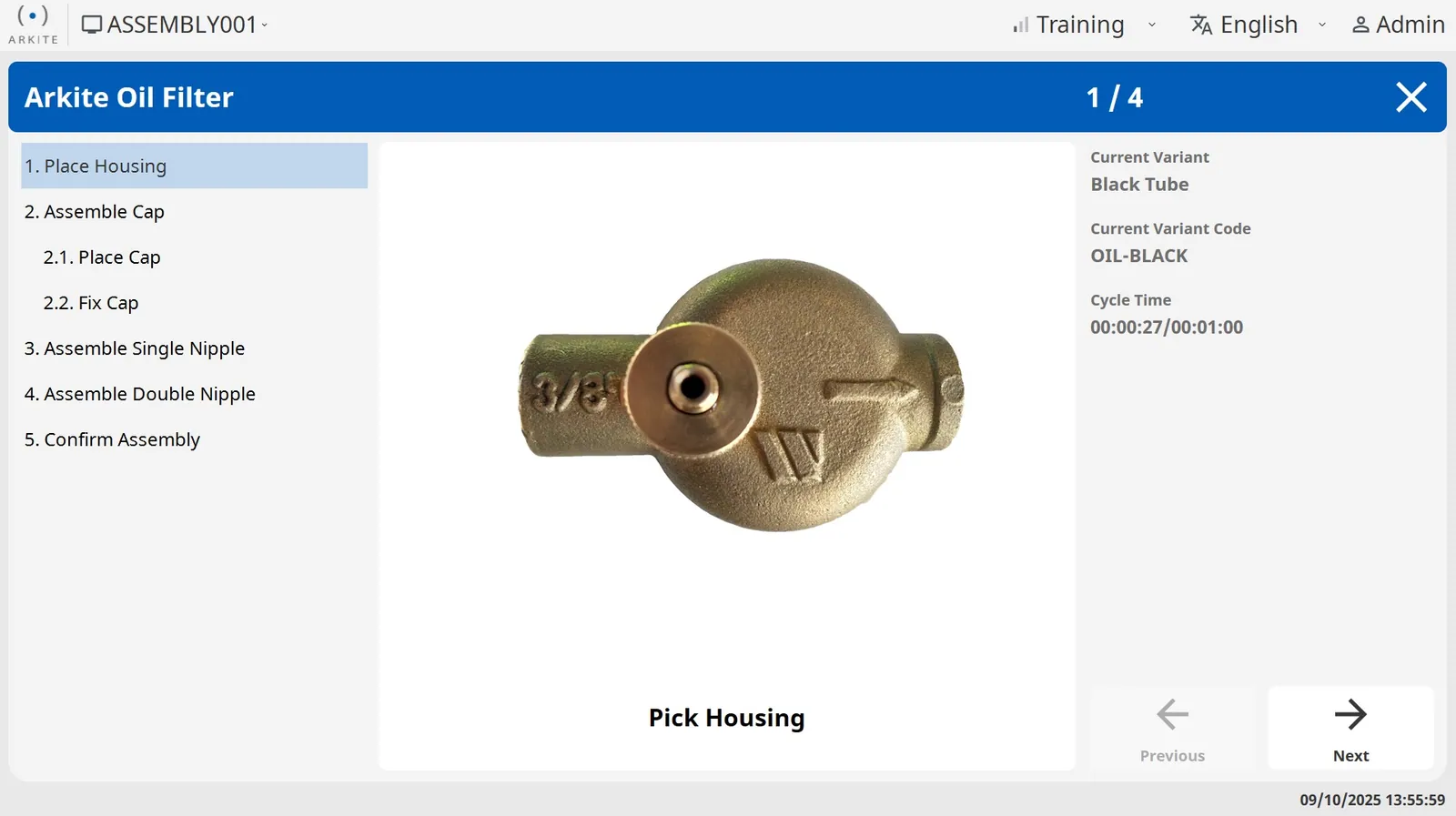
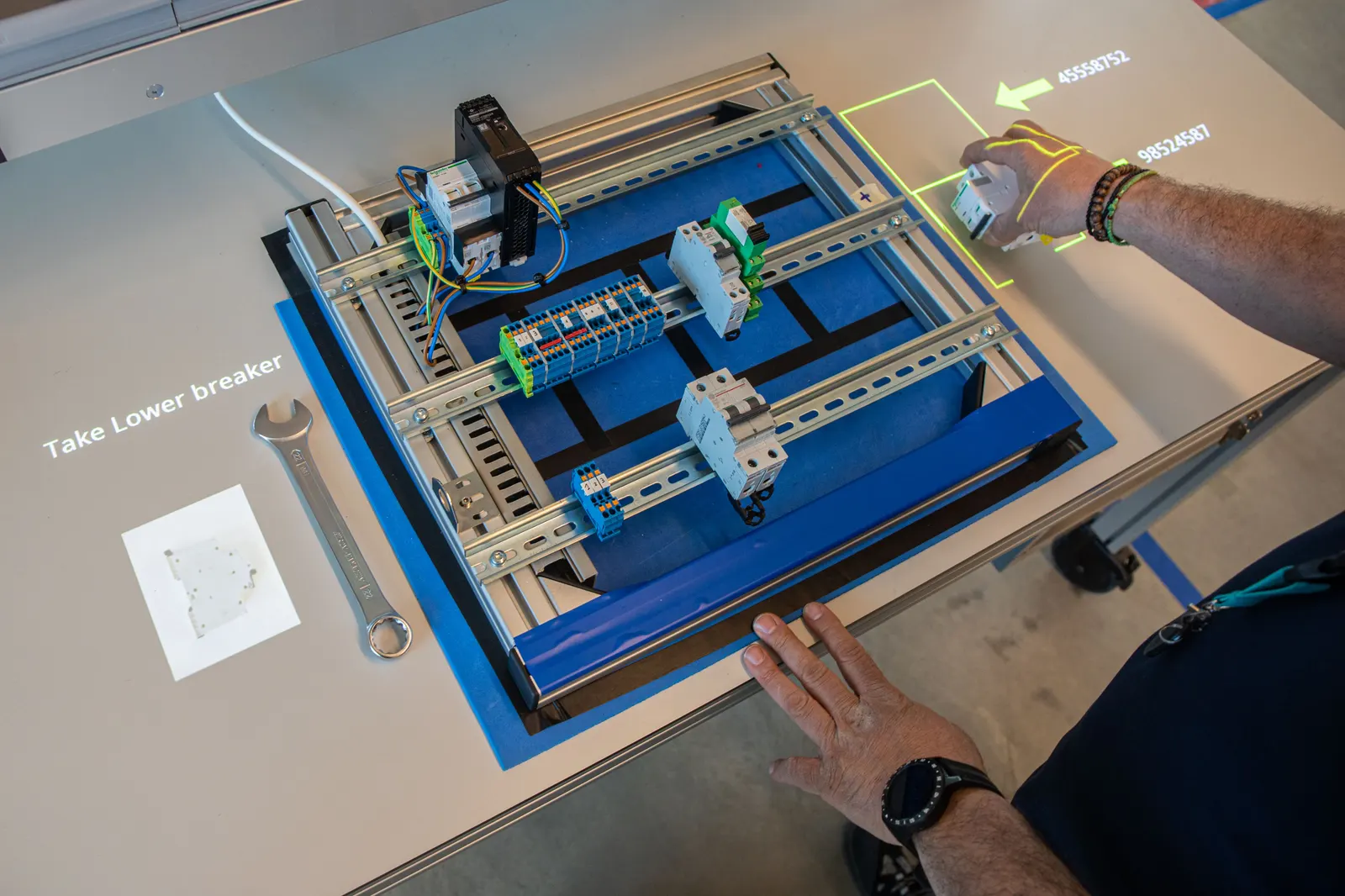
Each step can combine text, images and video on the screen with projected arrows, outlines and highlights on the work surface.
Build instructions once in a no-code editor. Arkite shows each step on the workstation and the operator screen, adapts to the variant and the operator, and checks the work as it is done.
What are digital work instructions?
Digital work instructions are step-by-step assembly instructions created and managed in software instead of on paper or in PDF files. In Arkite they are built in a no-code editor, released centrally to every workstation and shown in the operator's line of sight, one step at a time.
Paper and PDF instructions are hard to keep current across variants and stations, and they leave no record of how each unit was built. Digital work instructions in Arkite are maintained in one place and become guidance at the workstation.
Engineers define the steps, materials and detections in the no-code editor on any PC connected to the Arkite server, without stopping production.
Options such as color, size or extra parts combine into variants. Shared steps are written once and variant-specific steps appear only when they apply.
With the optional Arkite AI integration, a first version of the job is generated from a written description and all texts are translated. The engineer reviews and finalizes it.
Jobs go through draft, review and production. After approval they are available on every workstation that needs them.
The workstation loads the right job by scan or from a connected MES or ERP, and shows each step on the work surface and the operator screen.
Each step can combine text, images and video on the screen with projected arrows, outlines and highlights on the work surface.
Job options and variants keep one maintained job for the whole product family. Variants import from and export to CSV.
New operators get more guidance, experienced operators only what they need. The level is set when the operator logs in with a badge.
Instructions in the operator's language, with optional AI translation of all texts from the default language.
The operator confirms a step with the touch screen, a virtual button, a hardware button or a foot pedal, or automatically when Arkite checks the step.
A full version history, an approval workflow before release, and documentation exported to PDF per variant and language.
Most digital work instruction software shows the right step on a screen. Arkite runs the same instructions as operator guidance: each step is shown where the work happens and can be checked as it is done.
Start with guided instructions, and add checking or product inspection on the workstations where an error costs the most. The jobs you built stay the same.
| Paper or PDF | Screen-based instructions | Arkite | |
|---|---|---|---|
| Step-by-step guidance at the workstation | – | ||
| One central version on every station | – | ||
| Instructions shown on the work surface itself | – | – | |
| Correct variant loaded by scan or from MES | – | Depends on system | |
| Each pick and placement checked | – | – | |
| Data per unit: cycle times, errors, torque values | – | Partly |
Digital work instructions describe the steps of a task in software. Operator guidance uses those instructions at the workstation: it shows each step where the work happens, adapts to the operator and the variant, and can check the step as it is done. Arkite does both on one platform.
No. Jobs, steps, variants and detections are built in a no-code editor. Conditions, loops and communication with external systems are configured, not programmed.
Yes. Any PC connected to the Arkite server can act as an editor, so projects are prepared at the engineer's desk without stopping production.
Jobs are stored centrally on the Arkite server. After approval, a new version is available on every workstation that needs it, without visiting each station.
No. Instructions are projected on the work surface and shown on the operator screen. No headset or glasses are needed.
No. Arkite runs stand-alone, with jobs created in Arkite and selected by scan or on the operator screen. When an MES or ERP is connected, it can send the order and variant automatically.
Tell us about your product and current instructions. We show how they become guided, checked work.
Your privacy choices
We use analytics to understand how the website is used and to measure the results of our campaigns on LinkedIn, Google, Microsoft and Meta. Statistics and conversions run through our own server. To show our ads to earlier visitors, tags from Google, Microsoft and LinkedIn are loaded in your browser. Embedded calendars, webinar forms and videos come from their providers and may set their own cookies. See our privacy notice.